
User Reference Guide
Note: This documentation applies to current stable version. For older versions, start XSM without parameters to display list of available options.
XSM V7.00 is exclusively available as a 64-bit release. Legacy 32-bit XSM releases are discontinued.
Summary
- Introduction to XSM
- Activating XSM
- Running XSM
-
Directories defined by XSM_*_DIR variables ***
 v7.00 ***
-
Parameter Statements
- the SORT/MERGE statement
- the RECORD statement
- the INPFIL statement
- the OUTFIL statement
- the INCLUDE/EXCLUDE (OMIT) statement
-
the OUTFILDUP statement *** v6.94 ***
- the OUTREC statement
- the SKIP_HEADER[S] statement
- the OPTION statement
- the IOERROR statement
- the SORTWORKS statement
- the STORAGE statement
- Command-line Syntax
-
Sample sort jobs: the easiest way to get started
- Job 1 : Single text file
- Job 2 : Single text file, redirecting stdout stream
- Job 3 : Single text file, redirecting stdin and stdout streams
- Job 4 : Two Binary files, sortworks on distinct disks for I/O optimisation
- Job 5 : Two Binary files, filtering records with OMIT
-
Job 6 : CSV Text File with variable field length and field separator
Take a look at our illustrated demo - Job 7 : Binary file with Packed Decimal zones
- Job 8 : Text file with date field 'mmddyy', changing Y2K century pivot
- Job 9 : Several text input files with identification and removal of duplicate records
- Job 10 : Copy a text file and selective split onto several output files
- Job 11 : Sort a text file and selective split onto several output files
- Job 12 : Sort/Merge files and selective split onto several output files
- Job 13 : All In One : Merge + Deduplicate + Skip Header + Selective output with CSV
- Job 14 : Porting an MVS JCL step with XSM
- Destructive vs non destructive sort
- Performance Issues
- Running XSM as a User Exit
- Messages & Return Codes
- CHANGELOG
- FAQ
1. Introduction to XSM
XSM is a fast sort program that reads one or more input files, sorts all the lines or records according to user defined 'sort keys', and writes final result onto one or more files, according to user defined 'Include/Exclude' filters.
XSM can sort 2 kinds of files:
- Fixed-length record files:
All records or 'lines' have the same length, including a trailing Carriage Return/Line Feed (Windows), or a trailing Line Feed (UNIX), if any. CR and LF are treated as other characters. - Text files (Variable-length record files), also called "flat files":
All lines are terminated by a CR/LF (DOS, Windows ...), or by a single LF (UNIX text files).
The sorting information (sort keys) in that lines may be at fixed columns (FIELDS) or in "variable length fields" (VFIELDS) separated by a given character (FIELDSEP).
The parmfile is mainly used to specify static parameters, such as sort fields, sortworks and options.
You can also specify parameters on command-line instead of using a parameter file. It is described below at Command-line Syntax section.
This is mainly used to specify variable parameters, such as input and output file names. Then you can make the most of Environment Variables in batch scripts (UNIX shells, Windows .bat) to pass XSM input/output file names.
It is recommended to make use of Parmfile and command-line parameters together:
- Parmfile contains static statements, such as sort fields and filtering options
*************** parameter file job1.xsm *********
 SORT     FIELDS=(14,7,C,A)   ; One sort key : position 14, length 7, Characters, Ascending
 RECORD   RECFM=V,LRECL=200   ; text variable format ended with CR/LF, max record length 200 car
 OMIT     DUPKEYS             ; shortcut for OMIT DUPLICATE KEYS filter
- The command line contains dynamic parameters such as input/output file names
hxsm700 --verbose --inpfile=/data/fp1.dat --outfile=/data/fp1.sorted job1.xsm
XSM has used a multithreaded engine since version 5. In XSM 7.00, adaptive resource-management logic automatically selects parallelism and determines the appropriate memory and temporary disk-file (“sortworks”) resources according to the available resources and the type and size of the input files. For most workloads, no manual tuning is required, and this adaptive management reduces the risk of out-of-memory situations.
Default XSM processing mode is "destructive sort" for optimal performance, as opposed to "stable". It can be configured for non-destructive or "stable" sort mode.
See below "destructive/non-destructive sort" discussion.

2. Activating XSM
XSM is delivered as a ready-to-use binary: no software installation is required. The package contains hxsm700 and the hhnsinst activation program.
After extracting the package, make the programs executable on Linux or AIX, then activate XSM on the target system:
chmod +x hxsm700 hhnsinst
./hhnsinst ./hxsm700
On Windows, run activate_xsm.bat, or use:
hhnsinst.exe hxsm700.exe
You may then move hxsm700 and hhnsinst to your preferred directory, such as /usr/local/bin, /opt/xsm or a Windows directory included in PATH.
An activation is bound to the system where it was performed. If the binary is copied to another system, it must be activated on that system.
3. Running XSM
Running XSM is quite simple:
1) Create a parameter file that describes the job to do:
- which files to sort (if not standard input)
- what kind of files: fixed length (binary), or text file
- what are the sort keys
- where to put the final result (if not standard output)
- what resources are to be used: memory, directories for temporary sortworks, ...
- optional features (deduplicate, filtering, ...)
2) At the OS command prompt --- a UNIX terminal or Windows cmd.exe ---, just type:
hxsm700 your-parmfile
3) Verbose switch:
You may follow your job running, with each step's details and duration by using the -v (verbose) or -vv (very verbose) switch:
hxsm700 -vv your-parmfile
4) Check switch:
Once the sort job is ended, you may want to check that the output file is correctly sorted according to the parameter file.
Just use the -c switch:
hxsm700 -v -c your-parmfile
Note that there is a command-line with traditional switches described below, which may replace the parameter file in most cases. It is useful to specify input and output file names that come from environment variables.
Next section is the Parameter Statements.
For an easy start, see some Sample Sort Jobs below.
To display help, just run
 hxsm700
   or
 hxsm700 -h
   or
 hxsm700 --help
To display only the program version:
hxsm700 --version
Directories defined by XSM_*_DIR variables *** v7.00 ***
XSM V7.00 makes it easy to keep the program, parmfiles, input data, output data and temporary files in separate directories:
XSM_PARM_DIR: directory containing parmfiles;XSM_INPUT_DIR: prefix for input filenames;XSM_OUTPUT_DIR: prefix for output filenames;XSM_SORTWORKS_DIR: one or more work directories, separated by commas.
When one of these variables is set, the corresponding name passed to XSM must be a simple filename without a path. The directories must exist before XSM is started. An explicit SORTWORKS statement or --sortwork option takes precedence over XSM_SORTWORKS_DIR.
Linux/AIX example:
export XSM_PARM_DIR=/opt/xsm/parmfiles
export XSM_INPUT_DIR=/data/in
export XSM_OUTPUT_DIR=/data/out
export XSM_SORTWORKS_DIR=/work1/xsm,/work2/xsm

hxsm700 -vv job01.xsm
Windows example:
set "XSM_PARM_DIR=C:\XSM\parmfiles"
set "XSM_INPUT_DIR=D:\data\in"
set "XSM_OUTPUT_DIR=D:\data\out"
set "XSM_SORTWORKS_DIR=E:\xsmwork,F:\xsmwork"

hxsm700.exe -vv job01.xsm
With these examples, the command line uses only job01.xsm. In the parmfile, use for example INPFIL customers.dat and OUTFIL customers.sorted: XSM builds the complete paths from the environment variables.
4. Parameter Statements
XSM reads its parameters from a simple text file. We call it 'parameter file' or 'parmfile'.If you prefer not to use a parmfile, most statements can be given on the command-line.
The parameter file is a set of following statements:
    SORT/MERGE statement    - mandatory  if not OPTION COPY
    RECORD statement        - mandatory
    INPFIL statement        - optional
    OUTFIL statement        - optional
    OUTREC statement        - optional
    INCLUDE statement       - optional
    EXCLUDE|OMIT statement  - optional
    OUTFILDUP statement     - optional
    SORTWORKS statement     - optional
    IOERROR statement       - optional
    STORAGE statement       - optional
    OPTION statement        - optional
Statements can start at any column, though is it recommended to begin on columns 1 to 8 for readability.
Comments marks are:
- a semicolon
';'anywhere in a line, - or a star
'*'at the beginning of a line, - or a number/hash sign
'#'symbol at the beginning of a line.
# this is a comment
* this is a comment
; this is a comment
 INPFIL /tmp/data/myinput.file        ; this is a comment for my input file
Empty lines are permitted wherever you feel.
The SORT/MERGE statement
 SORT or MERGE     FIELDS=(start,length,type,direction[,start,len,type,direction,..])
                     or
                   FIELDS=(start,len,direction[,start,len,direction,..]),FORMAT=type
                     or
                   FIELDS=ALL
                     or
                   VFIELDS=(start,len,type,dir.[,start,len,type,dir.,..]),FIELDSEP=car

       start     : start column of sort field if fixed field (FIELD=)
                   field number if variable fields (VFIELDS=)

       length    : sort field length (FIELDS)
                   sort field max length (VFIELDS)

       type      : B or BI (Binary)      - binary field
                   C or CH (Char)        - normal ASCII characters (default)
                   I (Ignore case)
                   N or NU (Numeric)     - only '0' .. '9' characters (VFIELDS only)
                   P or PD (Packed)      - Packed decimal field
                                           (Binary files only, last half byte = sign)
                   Y or Y2K (yy)         - 2 bytes numeric field containing year of a date
                                           (would contain '84' for year 1984). Pivot year (option Y2KSTART,
                                           defaut 1970) is used to determinate if a year, for instance 17,
                                           means 1917 or 2017.  (see Y2K faq)


       direction : A (Ascending order), D (Descending order)

       FORMAT    : short form to use only when all sort keys have the same type
                   Thus, following statement
                        SORT FIELDS=(14,10,CH,A,24,10,CH,A)
                   can be simplified as
                        SORT FIELDS=(14,10,A,24,10,A),FORMAT=CH

       FIELDSEP  : The field delimiter/separator FIELDSEP sub-parameter value can be a symbolic name,
                   or a single character, or an hexadecimal value.

                   Using symbolic name is recommended for general punctuation chars to avoid syntax parsing
                   errors, specially with comments markers ';', '#'.

                   Symbolic names accepted:
                      BAR         =  the '|'  char
                      TAB         =  the Tabulation (X'09') char
                      COMMA       =  the ',' char
                      COLUMN      =  the ':' char
                      DIARESIS    =  the '#' char
                      SLASH       =  the '/' char
                      BACKSLASH   =  the '\' char
                      SEMICOLUMN   or SEMI-COLUMN   = the ';' char
                      SINGLEQUOTE  or SINGLE-QUOTE  = the "'" char
                      DOUBLEQUOTE  or DOUBLE-QUOTE  = the '"' char

                   Hexadecimal value: X'hh'
                      (Hex syntax : UPPERCASE X, Singlequote, 2 Hex digits, Singlequote)

                   Default value is TAB

                   Examples:
                      VFIELDS=(.....),FIELDSEP=SEMI-COLUMN
                      VFIELDS=(.....),FIELDSEP=@
                      VFIELDS=(.....),FIELDSEP=              ; Field separator is space char
                      VFIELDS=(.....),FIELDSEP=X'7C'
                      VFIELDS=(.....)                        ; Default Field separator is TAB


Command-line equivalent: --sort / --merge --key=
SORT verb is used for one or more input files.
MERGE verb is used to merge at least two files already sorted files.
To understand difference between SORT and MERGE, see SORT/MERGE discussion
One of SORT or MERGE statement is mandatory, unless using OPTION COPY
The FIELDS parameter describes sort keys at fixed column in the line (RECFM=V) or the record (RECFM=F).
FIELDS=ALL : the sort key is the whole record.
The VFIELDS parameter describes variable length sort keys separated by a given char.
This parameter cannot be used for Binary Files (RECFM=F).
When using VFIELDS, specify field separator with FIELDSEP=
 SORT FIELDS=(17,3,B,D,1,15,B,A)
     or
 SORT FIELDS=(17,3,BI,D,1,15,BI,A)
     or
 SORT FIELDS=(17,3,D,1,15,A),FORMAT=BI
This means:
- the 1st sort field starts at column 17 of each record, ends at col. 17 + 3 -1 = 19, type Binary, descending order,
- the 2nd sort field starts at col. 1 of each record, ends at col. 1 + 15 -1 = 15, type Binary, ascending order.
 SORT FIELDS=(2,4,B,A) ; sorts a 4-byte binary integer in Descending order
 SORT FIELDS=(6,2,B,D) ; will sort a short (16 bits) in Ascending order
 SORT FIELDS=(2,8,B,A) ; will sort a long (8x8=64 bits) in Descending order (created on a 64-bits OS)
Sorting a text file using a name at pos.12 for 20 bytes, ignore case:
SORT FIELDS=(12,20,I,A)
Sorting a Binary file using a packed decimal number at pos. 7 for 4 bytes, reverse order:
SORT FIELDS=(7,4,P,D) ; 7 BCD digits, with sign
Sorting a text file with variable fields, separated by ':', using:
- a name in field #12, max. length 20 bytes, ignore case:
- a number in field #7, at most 9 digits (chars '0' .. '9'), reverse order
SORT VFIELDS=(12,20,I,A,7,9,N,D),FIELDSEP=:
Same with a blank as field separator:
SORT VFIELDS=(12,20,I,A,7,9,N,D),FIELDSEP=
Same with the TAB char as field separator:
 SORT VFIELDS=(12,20,I,A,7,9,N,D),FIELDSEP=TAB
    or
 SORT VFIELDS=(12,20,I,A,7,9,N,D)  ;   FIELDSEP=TAB implied (default)
Dates like "mmddyy', pos. 21-26, descending order
SORT FIELDS=(25,2,Y,D,21,2,B,D,23,2,B,D)
Sorting whole lines in a text file:
SORT FIELDS=ALL
See XSM sample jobs
The RECORD statement
  RECORD RECFM=record format,LRECL=record length

   record format : F  for Fixed,
                   V  for Variable
                   T  for Text   (V and T are equivalent)
                   M  for MicroFocus "MFCOBOL"" or "MFVariable"

   record length : Exact record length for RECFM=F, including any separator CR/LF
                   Maximum record length for RECFM=V, excluding line separator CR/LF

Equivalent command-line parameter: --recfm= --lrecl=
The RECORD statement tells XSM if record type is fixed length or variable length.
The RECORD statement is mandatory. With RECFM=V, LRECL is internally added by 2
to include CR/LF (Windows/UNIX flat text files) RECFM=M is used for MicroFocus COBOL
special variable format known as "MFCOBOL" or "MFVariable" RECFM=M is used for
Microfocus Variable Format Record Sequential File
special format, known as "MFCOBOL" or "MFVariable" composed of:
- a 128 bytes header
- a series of records [ Header ][ Variable length data ][ Padding ].
- a series of records [ 4 Bytes Record Descriptor Word (RDW) header ][ Variable length data ]
To process IBM Variable files received by FTP from DOS/VSE, MVS, z/VM, z/OS:
- Transfer FTP ASCII, Quote site NORDW (default):
Once on UNIX/Windows, files are ASCII text, variable length records, terminated by CR/LF, without RDW.
For XSM, use RECORD RECFM=V,LRECL=xxxx (xxxx = maximum record length) - Transfer FTP ASCII, Quote site RDW :
Once on UNIX/Windows, files are ASCII text, variable length records, terminated by CR/LF, with RDW (binary) prefix.
For XSM, use RECORD RECFM=V,LRECL=xxxx (xxxx = maximum record length) and shift (add +4) all sort key positions. - Transfer FTP Binary, without RDW:
Makes no senses as we don't know the record length.
- Transfer FTP Binary, with RDW:
Not supported by XSM.
Examples:
RECORD RECFM=F,LRECL=400
means that all the records have the same (fixed) length of 400 bytes
File size must be multiple of 400.
RECORD RECFM=V,LRECL=133
means that this is a text file, and that the maximum line length is 133 (excluding CR/LF);
See XSM sample jobs
The INPFIL statement
Form 1:
 INPFIL filename

        filename   : input file name

Command-line equivalent: --infile=
Form 2:
 INPFIL DD:varname

           varname   : Environment variable name holding input filename.
The INPFIL statement describes input file names.
The INPFIL statement is optional: if omitted, the standard input (stdin) will be used as input file (UNIX style redirection and pipe are allowed).
one INPFIL statement per input file
As of Versions 450/510, files may be specified 'a la MVS' by a ddname: DD:variable
In that case, XSM will get the 'dsname' (file name) via the corresponding environment variable.
 INPFIL C:\Myjob\BIGF.INP             # Windows
 INPFIL D:\TMP\Wrk.Dat                # Windows

 INPFIL /home/hh/bigf.inp             # UNIX
 INPFIL /home/hh/littlef.inp          # UNIX

 INPFIL DD:SORTIN1                    # any systems
 INPFIL DD:SORTIN2                    # any systems
 INPFIL DD:JOHNNY                     # any systems

# SORTIN1, SORTIN2, and JOHNNY are environment variables containing filenames
See XSM sample jobs
The OUTFIL statement
The OUTFIL statement defines output file names, and optional INCLUDE/EXCLUDE filters.It allows to define filters per output files.
The OUTFIL statement is optional: if omitted, the standard output will be taken as output file (redirection and pipe allowed).
Note: the output file may one of the input files and overrides it, but in SORT operations only.
Form 1 : output filename "hard" defined in the parameter file
 OUTFIL filename[,INCLUDE/EXCLUDE=(condition1,[AND/OR,condition2...)]
                [,RECFM=recfm][,LRECL=lrecl][,DISP=disp]

        filename   : output file name

        condition  : start,length,datatype,operator,pattern

                     start     : start pos of zone to compare
                     length    : length of zone to compare
                     type      : 'CH' (Char) or 'BI' (Binary)
                     operator  : EQ or NE or LT or LE or GT or GE
                     pattern   : C'cccc' where cccc = string to compare
                                 X'xxxx' where xxxx = hexadecimal string to compare
                                 N'nnnn' where nnnn = numeric value to compare

                                Length of string must equal length of zone to compare

        recfm :     output record format if different of the input one :
                    RECFM=V or RECFM=F


        lrecl :     output logical record length if different of the input one.
                    For RECFM=V (variable), record is truncated if output LRECL is smaller than input LRECL
                    Pour RECFM=F, truncate record of smaller than input LRECL,
                          add padding if larger that input LRECL


        disp :      "Disposition"  in case output file exists before XSM starts :
                       DISP=NEW       : abort of output file already exists
                       DISP=OVERWRITE : overwrites output file (default)
                       DISP=APPEND    : "Appends" if output file already exists


Command-line equivalent: --outfile=
Form 2 : output file is defined by an environment variable
OUTFIL DD:varname[,INCLUDE/EXCLUDE=(condition1,[AND/OR,condition2...)]
                  [,RECFM=recfm][,LRECL=lrecl][,DISP=disp]

           varname   : Environment variable name containing output filename.
Form 3 : FILE=nn / variable SORTOFnn association
Deprecated, maintained for compatibility withIBM DF/SORT and previous XSM releases. Use DD:varname form instead.
 OUTFIL FILE=nn[,INCLUDE/EXCLUDE=(condition1,[AND/OR,condition2...)]
                      [,RECFM=recfm][,LRECL=lrecl][,DISP=disp]

        FILEnn associates environmet variable SORTOFn where nn is an integer greater than 0.

Example :

 OUTFIL FILE=01,INCLUDE=(8,2,CH,EQ,75)       ; variable SORTOF1 for Paris department
 OUTFIL FILE=02,INCLUDE=(8,2,CH,EQ,14)       ; variable SORTOF2 for Normandie department
 OUTFIL FILE=971,INCLUDE=(7,3,CH,EQ,971)     ; variable SORTOF971 For Guadeloupe department
 ...
Examples:
 OUTFIL D:\TMP\BIGF.OUT                                  ;  Windows full pathname style, no filters

 OUTFIL /home/hh/bigf.out                                ;  UNIX full path name style, no filters

 OUTFIL DD:FOO                                           ; using FOO environment variable FOO, no filters

 OUTFIL DD:FOO2,EXCLUDE=(11,3,CH,EQ,C'POP')    ; drop records that match 'POP' in column 11

 OUTFIL /data1/clients1.dat,EXCLUDE=(11,3,CH,EQ,C'POP') ; same, but with hard coded filename
                                                         ; instead of a variable

 OUTFIL DD:XYZ1,INCLUDE=(11,3,CH,EQ,C'MAR',
                          OR,
                         11,3,CH,EQ,'GAS')               ; only write records that match 'MAR' or 'GAS'
                                                         ; at column 11

Note : Do not insert comments inside a conditional clause !
See sample job with COPY and selective output DD:...,INCLUDE=(...)
The INCLUDE/EXCLUDE/OMIT statements
INCLUDE defines conditions to keep records.
EXCLUDE or OMIT defines conditions to eliminate records.
Form 1 : Deduplicating, one or several output files
            NONE                     ; nothing suppressed (default, for IBM D/SORT compatibility)

            DUPLICATE KEYS           ; suppress all lines/recordsa with duplicate sort keys
         or DUPKEYS                  ; equivalent to DFSORT SUM FIELDS=NONE de DFSORT.
 OMIT    or DUPKEY

            DUPLICATE RECORDS        ; suppress duplicate lines/records
         or DUPRECORDS
         or DUPRECORD
         or DUPRECS
         or DUPREC

Command-line equivalent: --unique-key / --unique-record
You can write all duplicate records (on key or record) to a specific file, Using statement OUTFILDUP, and option WRITEFIRSTDUPLICATE.
Form 2 : Conditional Filtering, only one output file
 INCLUDE
 EXCLUDE     COND=(column,length,type,operator,pattern[,AND|OR,col,len,type,oper,pattern,...])
 OMIT

      col        : start position of the field to be examined in each record (1..n)

      len        : field length

      type       : always 'CH' (useless but for IBM SORT compatibility...)

      operator   : one of 'EQ' 'NE' 'GT' GE' 'LT' 'LE'

      pattern    : constant C'ccccc...' where ccccc is characters string
                            X'xxxxx...' where xxxxx is hexadecimal value
               from v6.92 : N'nnnnn...' where nnnnn is numeric value
               from v6.93 : nnnnn...    where nnnnn is numeric value


Command-line equivalent: --include= / --exclude=
Successive INCLUDE,EXCLUDE statements (one statement per line) are processed with a 'AND' boolean operator.
  INCLUDE COND=(1,5,CH,GT,N'100')
  INCLUDE COND=(1,5,CH,LT,N'500')
is equivalent to:
INCLUDE COND=(1,5,CH,GT,100,AND,1,5,CH,LT,500)
INCLUDE COND=() or EXCLUDE COND=(...) statement works for only one output file.
As soon as there are several output files, You should use form 3 :
Form 3 : Selective Filter, several output files
 OUTFIL   DD:variable,INCLUDE|EXCLUDE=(col,len,type,op,pattern[,AND|OR,col,len,type,op,pattern ...])

 from v6.92 :
 OUTFIL   pathname,INCLUDE|EXCLUDE=(col,len,type,op,pattern[,AND|OR,col,len,type,op,pattern ...])
You can use EXCLUDE/INCLUDE operations with VFIELDS since v 6.92.
EXCLUDE and OMIT are synonyms.
Example 1:
 INCLUDE COND=(15,5,CH,EQ,C'JONES',OR,15,5,CH,EQ,C'SMITH')
 OMIT    COND=(11,3,CH,EQ,C'000')
These 2 filter statements mean:
- process records only if the field col.15-19 contains the names 'SMITH' or 'JONES'
- in the remaining set of records, throw away records where col.11-13 are equal to '000'
Example 2:
SORT    VFIELDS=(9,2,C,A,8,30,C,A,10,5,N,A),FIELDSEP=COMMA
RECORD  RECFM=V,LRECL=400

; ----------------  all clients:
OUTFIL  DD:ALLCLIENTS
; ----------------  only clients from New-York:
OUTFIL  DD:NEWYORKERS,INCLUDE=(9,2,CH,EQ,C'NY')
; ----------------  Client not in New-York:
OUTFIL  D:\data\app1\others.csv,EXCLUDE=(9,2,CH,EQ,C'NY')
; ----------------  only clients from Washingtown whose name start with AB, CD, or EF :
OUTFIL  DD:WASHDC,INCLUDE=(9,2,CH,EQ,C'WA',AND,
                              (11,2,CH,EQ,C'AB',OR,
                               11,2,CH,EQ,C'CD',OR,
                               11,2,CH,EQ,C'EF'))
These 3 OUTFIL filter statements mean:
- include all records into file defined by ALLCLIENTS environment variable
- include records with 9th field equals to "NY" into file defined by NEWYORKERS environment variable
- exclude these "NewYork" records to file
D:\data\app1\others.csv - include records whose 9th field equals "NY" AND whose 11th field starts with "AB", "CD" or "EF" in the file defined by the WASHDC environment variable
See XSM sample jobs
the OUTFILDUP statement
OUTFILDUP statement defines file in which duplicate records will be written, filtered on: OMIT DUPLICATE RECORDS or OMIT DUPLICATE KEYSIt can be either a full pathnamen or a variable:
    OUTFILDUP  /my/duplicate.file.txt

      ou

    OUTFILDUP  DD:Myvariable

Command-line equivalent: --outfiledup=
By definition, only duplicate records are written, but not the one that compares to duplicate.
To include this first record to duplicate file, use option WRITEFIRSTDUPLICATE or command-line flag --outfiledup-record1
The OUTREC statement
OUTREC statement is used to reformat records on output files.
There can be only one OUTREC statement.
If there are several output files, with OUTFIL DD:xxx,INCLUDE=(...) filters, then the OUTREC statement applies to all the ouput files.
The OUTREC statements formats records once they have been sorted and filtered ; So it is not necessary that output record contains sort keys.
Short Form :
  OUTREC  FIELDS=(start,length[,start2,len2...])

                 start    : start position

                 length   : field length

command-line equivalent: --outrec=
Long Form :
 OUTREC  FIELDS=(start,length,type,offset[,start2,len2,type2,offset2...])

                 start    : start position or padding value when type=B, P, or Z

                 length   : field length

                 type  C  : normal field to copy
                       S  : space padding
                       B  : byte : padding with value specified as 'start'
                       P  : Packed Decimal : Packed Decimal padding with value specified as 'start'
                       Z  : Zone Decimal : Packed Decimal padding with value specified as 'start'

                 offset : output position
Padding :
To padd with any given character, specify type B and specify padding character as "start"
- either as a chararter,
- or as Hex value,
- or as Decimal value.
All following syntaxes are equivalents to specfy padding from position 33 on 10 with 'A' character :
Beginning of record, zone 1 to 32, is automaticaly space (blank) padded.
  OUTREC FIELDS=(C'A',10,B,33)
  OUTREC FIELDS=('A',10,B,33)
  OUTREC FIELDS=(A,10,B,33)
  OUTREC FIELDS=(X'45',10,B,33)
  OUTREC FIELDS=(X45,10,B,33)
  OUTREC FIELDS=(65,10,B,33)
  OUTREC FIELDS=(D65,10,B,33)
  OUTREC FIELDS=(D'65',10,B,33)
  OUTREC FIELDS=(N65,10,B,33)
  OUTREC FIELDS=(N'65',10,B,33)
If input field is longer than output zone, then field is truncated
On VFIELDS (variable length fields with delimiter), output offset means rank
If necessary, record will be left padded with FIELDSEP
OUTREC FIELDS=(1,5,C,1,
               2,5,C,12)
will move 2nd field to 12th position :
Input file :John;Smith;;123;Output file :
John;;;;;;;;;;;;Smith;
Truncation :
To truncate a record, either RECFM=F or RECFM=V, add LRECL= + desired length to the OUTFIL parameter.
Each OUTFIL file definition can have its own output LRECLRECORD RECFM=V,LRECL=300 ; input file specification ... OUTFIL DD:OUTNORMAL ; this file will use the input LRECL=300 OUTFIL DD:OUT_L40,LRECL=40 ; this file will have max 40 char record length OUTFIL DD:OUT_L100,LRECL=100 ; this file will have max 100 char record length
Reformating Samples
  SORT FIELDS=(10,12,C,A)                        ; sort keys on pos 10, length 12, Character, Ascending
  RECORD RECFM=V,LRECL=200                       ; input is variable length records ended with LR or CR/LF

  INPFIL  /usr/include/stdint.h                  ; input file

  IOERROR IGNORE                                 ; get rid of empty lines

  OUTFIL DD:SORTOUT,INCLUDE=(3,6,C,EQ,C'define') ; filters only ""# define ..." lines

  OUTREC FIELDS=(10,12,C,20)                ; puts zone 10 to 21 at position 20
Input file : /usr/include/stdint.h
/* Limits of integral types.  */

/* Minimum of signed integral types.  */
# define INT8_MIN               (-128)
# define INT16_MIN              (-32767-1)
# define INT32_MIN              (-2147483647-1)
# define INT64_MIN              (-__INT64_C(9223372036854775807)-1)
 ...
Output file :
                   INTMAX_MAX
                   INTMAX_MIN
                   INT_FAST64_M
                   INT_FAST64_M
                   INT_FAST8_MA
                   INT_FAST8_MI
                   INT_LEAST16_
                   INT_LEAST16_
 ...
Now add a 10 character '-' padding on position 1 :
 OUTREC  FIELDS=('-',10,B,1,
                  10,12,C,20)
Output file :
----------         INTMAX_MAX
----------         INTMAX_MIN
----------         INT_FAST64_M
----------         INT_FAST64_M
----------         INT_FAST8_MA
----------         INT_FAST8_MI
----------         INT_LEAST16_
----------         INT_LEAST16_
 ...
Now add a Line Feed (1 byte, length 1) at position 23 :
 OUTREC  FIELDS=('-',10,B,1,
                  10,12,C,20,
                  X'0A',1,B,23)
Output file :
----------         INT
MAX_MAX
----------         INT
MAX_MIN
----------         INT
_FAST64_M
----------         INT
_FAST64_M
----------         INT
_FAST8_MA
----------         INT
_FAST8_MI
----------         INT
_LEAST16_
----------         INT
_LEAST16_
 ...
The SKIP_HEADER[S] statement
 SKIP_HEADER nnn
 SKIP_HEADERS nnn

Command-line equivalent: --skip-header=   --skip-headers=
The SKIP_HEADER statement will skip nnn first records (lines) from first input file.
The SKIP_HEADERS statement will skip nnn first records (lines) from every input files.
If INCLUDE/EXCLUDE filter is used, filter applies to records remaining after nnn first records skipped by SKIP_HEADER.
SKIP_HEADER and SKIP_HEADERS are mutually exclusives.
Example:SKIP_HEADER 4 # ignore 4 premières lignes d'entete du fichier
See XSM sample job with SKIP_HEADER
The OPTION statement
 OPTION  option1,option2,...
    or
 OPTIONS  option,option,...
where options are:
This option has meaning only for fields of type 'Y' or 'Y2K' (see below)
or
COLLATE=EBCDIC
It will keep ASCII characters keys in the following order:
- first, all lower-case letters,
- then all upper-case letters,
- and finally the digits 0..9
or
RSEP=byte
This option is primarily used for OPEN MVS and OS/400 for variable length files.
It defines a specific character (1 byte) at the end of each record to be considered as the Record Separator.
Defaults:
RSEP=0D0A (Windows)
RSEP=X15 (Open MVS)
RSEP=X25 (OS/400)
 OPTION RSEP=|
  or
 OPTION RSEP=7C
Command-line equivalent: --record-separator=
or
PROCESSORS=n
or
PROCS=n
For example, the following setting was used to request eight threads explicitly:
OPTION PROCS=8
It is recommended to let XSM decide for optimal resources use.
Command-line equivalent: --procs=or
KEEPORDER=Y|N
or
EQUALS
See explanation on stable sort below. Command-line equivalent: --keep-order
It tells XSM to selectively copy the input file(s) onto one or more output files.
Following COPY statements are equivalents, for IBM DF/SORT compatibility :
 OPTION COPY
   or
 SORT FIELDS=COPY
   or
 COPY

Command-line equivalent: --copy
COPY statement can followed by one or more following statements:
 OUTFIL DD:variable                    ; equivalent to OUTFIL DD:variable,INCLUDE=ALL
   or
 OUTFIL DD:variable,INCLUDE|EXCLUDE=(condition1[,AND/OR,condition2...])
See the 'OUTFIL' statement below See sample job with COPY and selective output DD:...,INCLUDE=(...)
ou
WRITEFIRSTDUP
With option "Write First Duplicate", this first record is also written to duplicate file.
  OMIT DUPKEYS

  #  Output file, deduplicated:
  OUTFIL     myoutput.txt

  # output file with duplicate records:
  OUTFILDUP  myduplicate.txt

  #  this is to write also first record that compared to duplicate
  OPTION WRITEFIRSTDUPLICATE


Command-line equivalent: --outfiledup-record1 ou --dup-rec1
Sample input file, we will sort on last name, first name:
01234001 JOHN     PALMER
05678001 BOB      JOHNSON
01234002 JOHN     PALMER
05678002 BOB      JOHNSON
06095300 KAREN    SMITH
Result of output duplicate data : (OUTFILDUP myduplicate) without WRITEFIRSTDUPLICATE option:
01234002 JOHN     PALMER
05678002 BOB      JOHNSON
Result of output duplicate data : (OUTFILDUP myduplicate) with WRITEFIRSTDUPLICATE option:
05678001 BOB      JOHNSON
05678002 BOB      JOHNSON
01234001 JOHN     PALMER
01234002 JOHN     PALMER
 Concurrent I/O on same disk: BAD!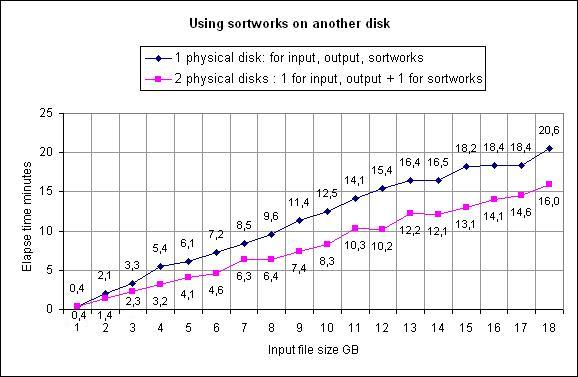
 We have a demo of this job!